
WHMCS
Version 1.0.0 · WHMCS 8.0 or later, on PHP 7.4 to 8.3.
Puts Talkfront live chat on your WHMCS client area, proves who is signed in, and keeps your clients in step with your contacts in Talkfront. An addon module, not a snippet to paste into a template.
An addon module with its own admin page: a connection test, a status readout and a full sync on demand.
Opens Settings → Plugins, where the download lives. You will need a Talkfront account and a website already added.
Every Talkfront plugin does the same three things: puts the widget on every client area page, verifies whoever is signed in, and keeps their details in step with your contacts. Here is what the WHMCS one has that the others do not.
Particular to WHMCS
Domains as well as services
The only one of the three that lists a client's domains beside their services, because WHMCS is the only one of the three platforms that sells them. Their client group comes across too, so an agent can see a reseller is a reseller before they answer.
An admin page of its own
Addons → Talkfront gives you a status readout, a connection test and a full sync on demand, so when something looks wrong you press a button rather than read a log.
Runs on PHP 7.4
WHMCS installs live on older stacks than most, so this one goes back to PHP 7.4 where the Paymenter extension needs 8.3. If you have been putting off an upgrade, it is not in your way.
Installing it
Copy a folder, activate the module, paste three keys. The admin page it adds under Addons is where you check it worked.
Start by downloading the zip from Settings → Plugins.
Copy the
modulesfolder into your WHMCS directory, so that you end up withmodules/addons/talkfront/talkfront.php.In WHMCS, go to System Settings → Addon Modules, find Talkfront and click Activate.
Click Configure, tick the admin roles that may see it, and save.
Fill in the keys below, save again, then press Sync all clients now once to send the clients you already have.
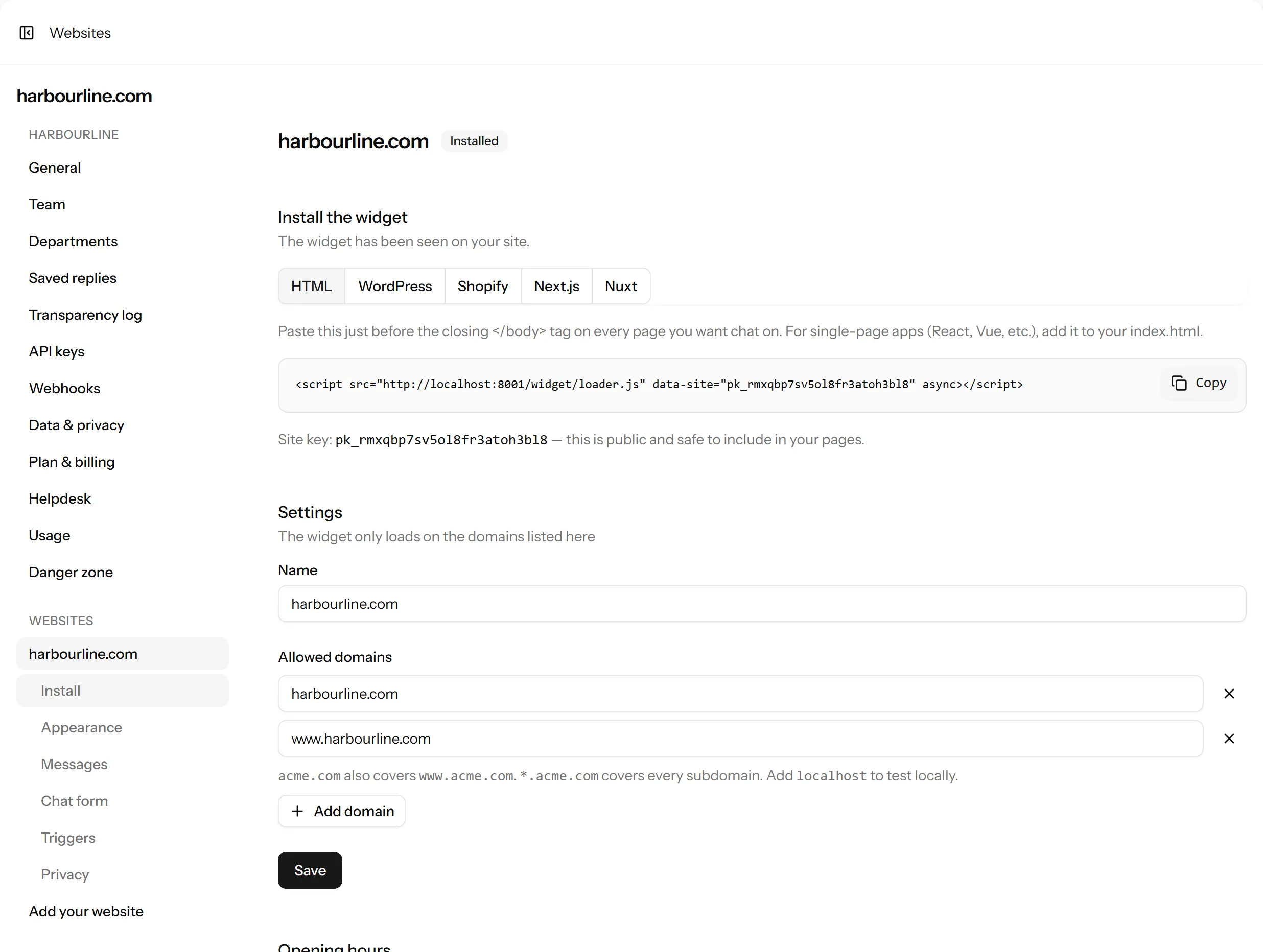
Add your WHMCS domain to the website’s allowed domains in Talkfront, or the widget is blocked without saying so.
The keys it asks for
The same three for every plugin, from the same two screens. What each one is for.
- Site key
- Talkfront → Settings → Websites → your website
- Identity key
- The same page, under Identity verification
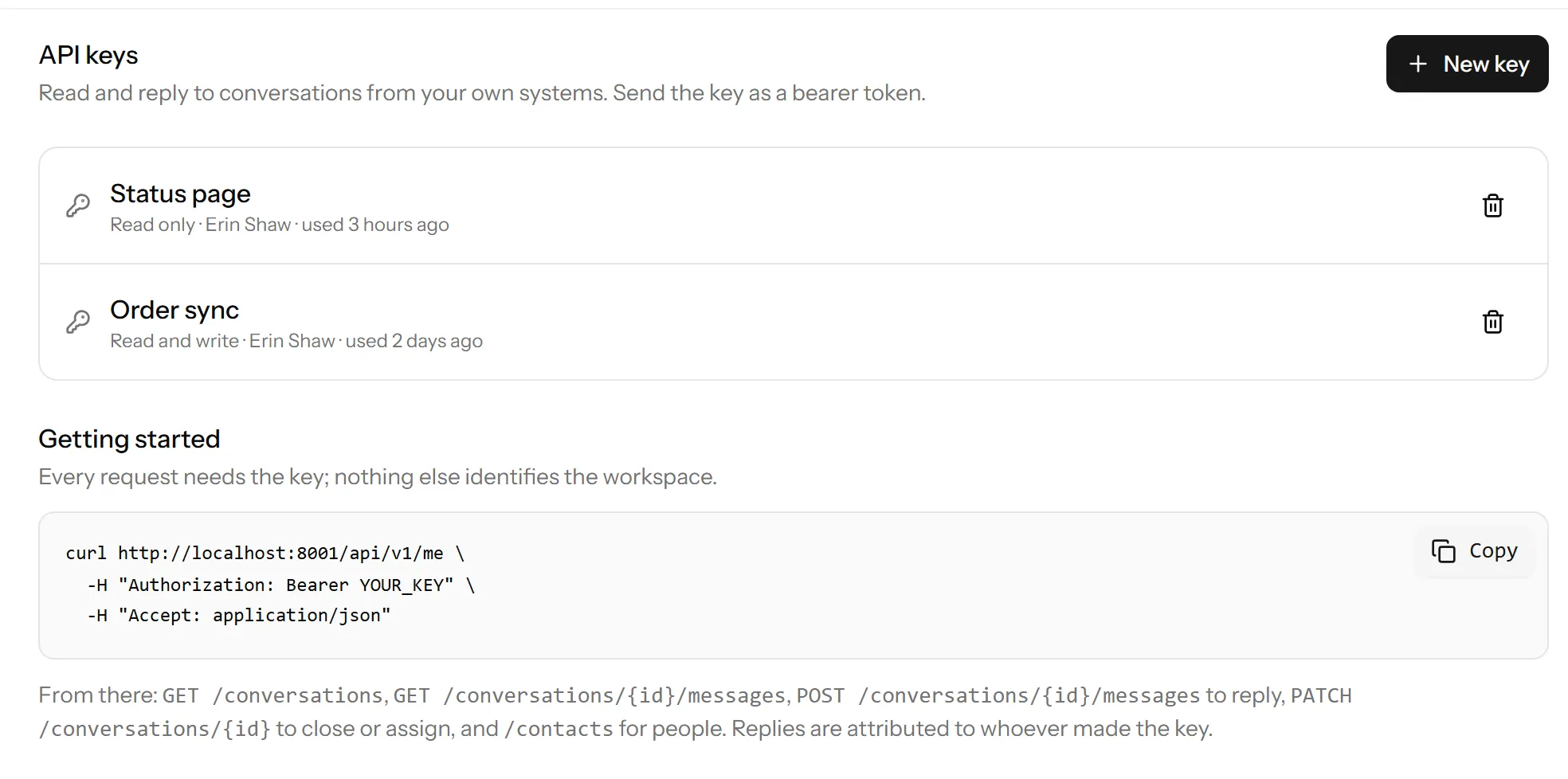
- API keyOptional
- Talkfront → Settings → API keys, with the write permission
How verification works
The plugin signs the WHMCS id with your identity key, on your server, and Talkfront checks the signature. Somebody who edits the page in their browser can change the name they show but can never become somebody else, and unsigned details never attach to a verified person.
It is the same mechanism whichever platform you are on, so if you have read this on another plugin’s page, you have read it.
What gets synced, and when
- A client is pushed when they sign in, when their details change, and when an invoice or a service moves.
- A nightly job catches what no hook fires for: an invoice falling overdue, a service the cron terminated. It does 2,000 clients per run by default and carries on from where it stopped, so a very large install catches up over a few nights rather than spending one entire night here.
- The module keeps a fingerprint of what it last sent for each client, so a client who has not actually changed costs one local query and no request at all.
If something isn’t working
- No chat button on the client area
- Check the site key is set and Show the chat widget is on, then check your WHMCS domain is in the website’s allowed domains in Talkfront. If your client area sends a Content Security Policy, the three sources to allow are here.
- Clients show as unverified
- The identity key is missing, wrong, or was regenerated in Talkfront and not pasted back in here.
- Nothing is syncing
- Press Test the connection on the module’s page. A read-only API key is the usual answer. Syncing needs one with write. Failed calls are written to Utilities → Logs → Module Log under
talkfront. - Details look wrong or stale
- Press Send everything again, then Sync all clients now. That throws away the fingerprints and re-sends every client.
Still stuck? Open a chat on this page, or email support@talkfront.app with your WHMCS version and what you are seeing.
Start talking to your visitors today
Create a workspace, paste one line into your site, and answer your first chat in a few minutes.
Free plan, no card needed.